
What Is an Order Management System and How It Works for Your Restaurant
· Thibault Le Conte
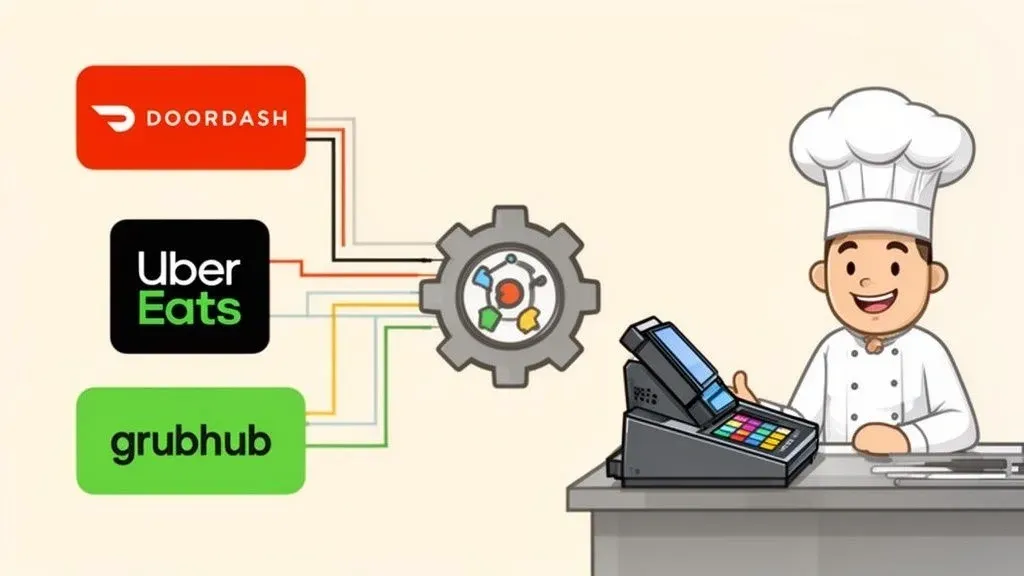
Think of an order management system as the central traffic controller for your restaurant’s entire delivery operation. In simple terms, it’s the software that automatically catches every incoming order from all your different delivery apps—like DoorDash or Uber Eats—and sends them straight to your kitchen’s printer. It all happens in one neat, organized flow, without anyone lifting a finger.
From a technical standpoint, it acts as a universal translator, connecting the unique software of each delivery app directly to your Point of Sale (POS) system. This eliminates the tedious manual work and costly mistakes that come with juggling multiple tablets, directly boosting your restaurant’s efficiency and bottom line.
The Hidden Costs of Manual Order Entry in Restaurant Operations
The dinner rush hits. The phone is ringing, the dining room is packed, and tablets from DoorDash, Uber Eats, and others are all screaming for attention. On the surface, this looks like success. But underneath that beautiful chaos, there’s often a silent profit killer at work: manual order entry.
Each time a tablet dings, a staff member has to stop what they’re doing—taking an in-person order, running food, or bussing a table—and become a data entry clerk. They have to manually punch every single detail of that digital order into your point-of-sale (POS) system. It’s a repetitive, mind-numbing task that’s ripe for human error.
How Manual Entry Sinks Your Bottom Line
This manual grind creates tiny leaks in your business that quickly add up to significant losses.
- Costly Errors: A single mistyped order means a wrong meal, an unhappy customer, and a remake that comes directly out of your food budget.
- Wasted Labor: Every minute an employee spends wrestling with tablets is a minute they aren’t providing great service to your in-house guests or upselling a profitable dessert. All that wasted time is a direct hit to your labor budget, reducing staff productivity. If you want to see just how much those minutes are costing you, check out our guide on how to calculate your restaurant’s labor costs.
- Poor Efficiency: When your best people are stuck doing administrative chores instead of creating a great guest experience, your entire restaurant’s efficiency plummets.
Why It Matters: The real cost isn’t just the time spent punching in an order; it’s the lost opportunity. It’s the delayed service, the potential for error, and the staff burnout that comes from managing controlled chaos every single night.
The Solution for Restaurant Delivery Chaos
This is exactly the problem an Order Management System (OMS) was built to solve. It’s the digital traffic controller for all your delivery channels.
When an order comes through Uber Eats, for instance, the OMS instantly grabs every detail—the customer’s name, their items, any special requests—and shoots it directly into your kitchen’s POS system, whether you use Clover or Square. No one has to touch a thing. This is what smart, modern restaurant operations look like.
As a real-world example, a busy pizzeria using a Square POS can see an order from DoorDash appear on their kitchen screen just like an in-person order, with no manual entry required. This saves time, reduces errors, and lets the staff focus on making great pizza.
What Is a Restaurant Order Management System, Really? A Look at Food Tech Integration
So, what exactly is an order management system (OMS) when we’re talking about a busy restaurant? Think of it as the ultimate translator for all your digital orders. Your Point of Sale (POS) system speaks one language, but each delivery app—like DoorDash or Uber Eats—speaks a completely different one.
An OMS is the critical piece of food tech that sits in the middle, translating everything so that all your orders flow into one single, manageable stream. It’s the tool that finally lets you ditch that dreaded “tablet farm” cluttering up your counter, improving your restaurant operations.
How POS Integration Works
On a technical level, an OMS uses something called an API integration. This is a secure, digital handshake between your delivery apps and your POS system. When a customer orders a burger with no onions from Uber Eats, the OMS instantly grabs every detail: the customer’s name, the order items, and all those special requests. It then translates this information into a language your POS can understand and shoots it directly into your kitchen’s workflow.
Why It Matters: This all happens in a matter of seconds, with zero manual data entry from your staff. The result? A massive reduction in human error and a huge boost to your team’s efficiency and productivity. It gives your staff back their most valuable resource: time.
This isn’t just a niche tool anymore; it’s becoming fundamental to running a modern restaurant. The global market for these systems was valued at $2,189.8 million in 2021 and is expected to rocket to over $9,018 million by 2033. That explosive growth shows just how essential this technology has become for restaurants trying to keep up.
The image below paints a clear picture of the all-too-common chaos that comes with manual entry. Your staff becomes the bottleneck, juggling tablets and trying to punch orders into the POS, which inevitably leads to mistakes and delays.

As you can see, automation simply removes that messy manual step, creating a direct, error-free line from the customer’s phone straight to your kitchen.
Manual Order Entry vs Automated Order Management
To truly appreciate the difference an OMS makes, let’s look at a side-by-side comparison of a restaurant’s daily grind with and without one.
Operational Task Manual Process (Without OMS) Automated Process (With OMS) New Order Arrival Staff hears a chime, finds the right tablet, and accepts the order. Order automatically appears in the POS and prints in the kitchen. Order Entry Staff manually re-keys every item and modification into the POS. Zero manual entry. The system handles it instantly. Menu Updates Manually update menus and item availability on each delivery app. Update once in the POS, and the changes sync across all platforms. Managing Pauses Staff rushes to each tablet to pause orders when the kitchen gets slammed. Pause ordering from a single button in the POS. Reporting & Analytics Manually pull sales reports from each app and combine them in a spreadsheet. All sales data is unified in one POS report for easy analysis.
The contrast is stark. One path is filled with repetitive, error-prone tasks that reduce staff productivity, while the other frees up your team to do what they do best: cook great food and serve customers.
From Chaos to Control: A Real-World Example
Let’s make this even more concrete. Imagine you run a popular cafe using a Square POS system. It’s the middle of the lunch rush, and five orders hit at once: two from DoorDash, two from walk-in customers, and one from your own website.
Without an OMS, your cashier is in the weeds. They’re trying to silence the DoorDash tablet, punch those two orders into the Square terminal, and somehow still take orders from the people standing right in front of them. It’s a recipe for mistakes, long waits, and a stressed-out team.
Now, let’s replay that scene with an OMS in place. Those two DoorDash orders pop up on the Square POS screen just like any other in-house order. They print directly to the kitchen printer, with all modifications perfectly listed. Your cashier is now free to focus entirely on giving great service to your in-person guests. This is the power of good multi-channel order management software; it takes all your different revenue streams and funnels them into one simple, headache-free process, saving time and reducing errors.
What a Good Restaurant OMS Actually Does
Not all Order Management Systems are built the same, especially for the controlled chaos of a restaurant. A truly effective system does more than just take orders; it becomes the central nervous system for your entire off-premise operation. Let’s look at the core features that actually make a difference to your restaurant’s efficiency and bottom line.

These pieces aren’t just separate functions. They work together to create a powerful, intelligent hub that connects your digital storefront directly to your kitchen.
Seamless POS Integration
This is the most critical feature. A great OMS must plug directly into your Point of Sale (POS) system, acting as a superhighway connecting all your delivery apps straight to the heart of your restaurant. Technically, it uses an API (Application Programming Interface) to let the delivery apps “talk” directly and securely to your POS.
Why It Matters: Without POS integration, your staff is stuck manually re-punching every order from a DoorDash or Uber Eats tablet into your Clover or Square terminal. That’s not just slow—it’s a recipe for expensive mistakes. A proper integration automates this entire flow, saving immense time and reducing order errors to nearly zero.
Centralized Menu Management
Picture this: It’s Saturday lunch rush, and you’ve just run out of avocados. Without a centralized system, someone has to frantically grab the Uber Eats tablet, then the DoorDash one, then the Grubhub one to 86 the guacamole. Centralized menu management completely eliminates this headache. You make the change once in your POS, and it automatically syncs across every single delivery platform.
Why It Matters: This feature prevents customers from ordering something you don’t have, avoiding frustration and negative reviews. It saves precious time during busy shifts, allowing staff to focus on customers instead of tablets. For example, a restaurant using a Clover POS can 86 an item, and it’s instantly removed from their Uber Eats and DoorDash menus, preventing lost sales and angry customers.
Unified Order Consolidation
An effective OMS acts like a funnel, pulling every single order from every platform into one clean, unified screen inside your POS. It’s the end of “tablet hell”—that chaotic counter space filled with multiple devices, each with its own alert. Your team gets a single, consistent view of every order.
- Fewer Mistakes: By showing all orders in the same format, you eliminate confusion.
- Massive Time Savings: Your team watches one screen they already know. No more tablet babysitting.
- A Calmer Kitchen: A single queue lets the kitchen staff tackle orders efficiently.
The demand for this kind of operational sanity is skyrocketing. The logistics automation market alone is expected to hit $5,802.5 million by 2033. This explosive growth shows just how critical specialized food tech has become. You can dive deeper into these market trends over on Netguru’s blog.
Ultimately, these core features work in harmony to take your restaurant from a reactive, chaotic state to a proactive, controlled system. It’s about saving time, cutting down on errors, and letting your team get back to making great food.
Ready to see how this could work in your restaurant? You can get started for free in just a few clicks on the OrderOut dashboard.
Why Seamless POS Integration Is a Game Changer for Restaurant Delivery
The true power of a restaurant order management system is unlocked when it connects directly to your Point of Sale (POS) system. This POS integration is more than a convenience; it’s what turns a flood of raw order data into razor-sharp business intelligence you can actually use to improve your restaurant delivery operations.
Think of it this way: when a team member manually punches an Uber Eats order into your POS, it’s just an isolated sale. But when that same order flows automatically from your OMS straight into the POS, it becomes a rich, trackable piece of data. This single automated step is the key to making food tech work for you.
Turning Data Into Dollars with Smart Integration
A seamless POS integration elevates a basic order aggregator into a genuine management system. It’s the critical difference between surviving delivery chaos and profiting from it. By feeding every order directly into your POS, you gain control and insight.
This deep connection makes several crucial functions possible, all of which pad your bottom line by saving time and cutting waste:
- Precise Sales Reporting: Instantly see which delivery channels are your top performers without stitching together reports from different apps.
- Real-Time Inventory Tracking: Every online order automatically subtracts from your inventory counts in the POS, preventing you from selling items you don’t have.
- Accurate Performance Analytics: Get a clear picture of your peak hours, most popular online dishes, and average ticket sizes across all channels from a single dashboard.
Why It Matters: Integration transforms your POS from a digital cash register into the central command center for your entire operation. It provides a unified view of every dollar you earn, whether it comes from a customer at the counter or one on their couch, helping you make smarter decisions about your menu, marketing, and staffing.
How Integration Fits Your Existing Workflow
The best technology adapts to your process, not the other way around. A great OMS is designed to be a natural extension of the tools your team already uses every day.
A key feature of an effective Restaurant OMS is the ability for integrating online ordering systems, offering convenience to customers and efficiency for the restaurant.
For example, when an OMS connects with a POS like Clover or Square, it doesn’t add a whole new system to manage. It works quietly in the background, making sure every DoorDash or Grubhub order pops up on the POS screen exactly like an in-house order. This is a massive win for your staff: no new software to learn. This is a vital point when considering integrated POS systems for restaurants.
The Real-World Impact on Your Bottom Line
Imagine a bustling Friday night at a pizza shop that uses a Square POS. Without an OMS, the manager spends Saturday morning manually downloading sales reports from three delivery apps and plugging numbers into a spreadsheet. With an integrated OMS, they can pull one consolidated sales report right from their Square dashboard the moment they close.
Why It Matters: This isn’t just about saving hours of admin work. It’s about getting instant, accurate data to make better decisions about your menu, marketing, and staffing for the next busy shift. That’s how seamless integration directly boosts your profitability by improving restaurant efficiency.
Ready to see this in action? Get started with a free and easy onboarding process on the OrderOut dashboard.
How OrderOut Turns Restaurant Chaos into Calm
We’ve covered the theory. Now, let’s look at how a system built specifically for restaurants solves these everyday headaches. A platform like OrderOut was created to build a seamless connection between the delivery apps everyone uses and the POS systems restaurants already have. It’s about making DoorDash and Uber Eats talk directly to your kitchen, without you playing translator.

The payoff is immediate. By eliminating manual work, you tackle the three things that eat away at a restaurant’s profit: wasted time, expensive mistakes, and distracted staff. You’re trading the constant stress of restaurant delivery for a workflow that’s smooth, profitable, and efficient.
Reclaiming Time and Boosting Staff Productivity
The first thing you’ll notice is how much time you get back. Manually entering a delivery order takes an average of 2-3 minutes. For a restaurant handling just 50 delivery orders a day, that’s up to two and a half hours of paid labor lost to data entry. With OrderOut, that time is instantly handed back to your team.
Why It Matters: This isn’t just about saving a few minutes. It’s about freeing up your staff to focus on what drives revenue: creating a great experience for your customers and selling more. Your front-of-house team can now focus on guests, suggest another round of drinks, or talk up the dessert menu. That shift from punching in orders to engaging with customers is a direct boost to staff productivity and your restaurant’s bottom line. You can learn more about how OrderOut’s technology helps improve restaurant operations.
Eradicating Costly Errors for Good
Every manual order entry is a chance for error. A “no onions” request becomes “extra onions,” a gluten-free note is missed, or the wrong item size is selected. These aren’t just small hiccups; they’re direct blows to your profits.
Every mistake costs you money and reputation through:
- Wasted Food Costs: The kitchen has to remake the dish, doubling your food cost for that item.
- Customer Dissatisfaction: A botched order often leads to a bad review, a refund demand, and a lost customer.
- Increased Labor: The line has to stop and remake the order, disrupting kitchen workflow.
Why It Matters: By automating the flow, OrderOut completely removes human error from the equation. The order a customer places on their app is the exact same order that prints on the kitchen ticket. This precision is a key part of modern food tech and directly translates to cost savings and higher customer satisfaction.
A Practical Next Step for Your Restaurant
Moving from a hectic operation to a streamlined one is easier than you think. A dedicated POS integration solution like OrderOut doesn’t require new hardware or extensive training. It works quietly in the background, making the tools you already use smarter.
Your team keeps using the Clover or Square POS they know and love, but now, delivery orders just show up automatically. The most practical next step for your business is to eliminate manual order entry forever. It’s about upgrading your restaurant’s entire engine for efficiency and profit.
Your Next Steps to Automated Order Management
Putting an order management system into practice is simpler than you might think. Modern systems are cloud-based, designed to be simple, fast, and get you back to running your restaurant operations without a hitch. The first step is picking a system that understands how restaurants work and integrates with your existing POS, whether that’s Clover or Square. The best food tech is the kind that quietly does its job in the background.
A Simple Path to Implementation
Once you’ve found the right partner, the setup is usually handled remotely and quickly.
- Quick Onboarding: It starts with a simple sign-up where you connect your POS system and delivery app accounts.
- Configuration and Syncing: The system then pulls your menus directly from your POS and syncs them across all your delivery platforms.
- Activation: Once connected, orders start flowing directly from the apps into your POS.
Why It Matters: The goal of a modern OMS isn’t to add another layer of complexity. It’s to remove one—the tedious, error-prone layer of manual order entry. This process is designed to be smooth and save you time from day one. If you’re curious to learn more, our detailed guide on automation in restaurants is a great next read.
Answering Your Top Questions About Order Management
Let’s walk through some of the most common questions restaurant owners have about implementing an OMS.
What’s This Going to Cost Me?
Modern systems typically use a predictable monthly subscription model. But the real conversation isn’t about cost; it’s about the return on investment (ROI). An OMS directly tackles profit-killing errors that lead to wasted food and refunds. It also frees up staff from data entry, boosting productivity.
Why It Matters: Think about the hidden costs that bleed your restaurant dry. The price of just one botched order or 30 minutes of a team member’s time spent on tablets adds up fast. An OMS plugs those leaks, turning it into a tool that saves you money. For most restaurants, the system pays for itself through time savings and error reduction.
Will This Thing Actually Work with My POS and Delivery Apps?
Compatibility is everything. A great OMS must act as a universal translator for your existing tech. It should be built to connect with the POS systems you already use, like Square and Clover, and plug directly into every major restaurant delivery platform—DoorDash, Uber Eats, Grubhub, and more.
Why It Matters: The whole point is to slide right into your existing workflow, not force you to overhaul it. Before you commit, get a clear “yes” that they support your specific POS and delivery services. This ensures your investment pays off from day one.
Is This Going to Be a Nightmare to Set Up and Train My Team?
A modern OMS is designed to make your life easier. For your staff, the change is almost invisible. They can say goodbye to the tablet farm. Instead, every delivery order will pop up directly on the POS screen they already use every day. Their process for handling a delivery order becomes the exact same as taking one from a customer at the counter. Training is practically a non-issue.
Why It Matters: A good OMS integration should simplify, not complicate. Because these platforms are cloud-based, there’s no messy hardware to install. Onboarding is done remotely in a few quick steps, getting you running without skipping a beat in service, saving you time and money right from the start.
The Takeaway: Your Practical Next Step
The most impactful change you can make to improve your restaurant’s efficiency, reduce costs, and boost staff productivity is to eliminate manual order entry. An order management system with seamless POS integration is the key to achieving this. It turns the chaos of multi-platform delivery into a streamlined, profitable part of your business.
Ready to swap manual entry and tablet chaos for calm, streamlined efficiency?
You can Start onboarding for Free in just a few clicks.