
How an Online Order Management System Drives Restaurant Efficiency and Profit
· Thibault Le Conte
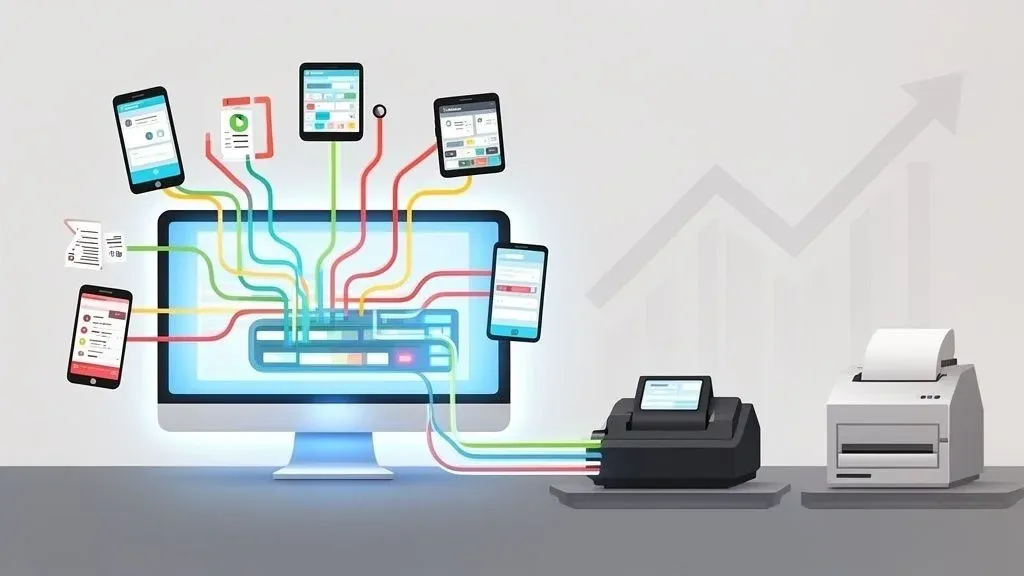
An online order management system is your restaurant’s digital command center. In simple terms, it’s software that grabs all your online orders from platforms like DoorDash and Uber Eats and puts them into one clean, manageable dashboard. For restaurant owners, this means no more juggling multiple tablets and frantically punching orders into the POS. It ends the chaos.
This isn’t just about tidiness; it’s about restaurant efficiency. Every minute your staff spends manually entering an order is a minute they’re not helping a guest or a dollar lost to potential errors. This system automates that process, directly impacting your bottom line.
What Is an Online Order Management System and Why Does it Matter for Restaurant Operations?
Picture a chaotic Friday night. Orders are pouring in from DoorDash, Uber Eats, and your website. Your host is glued to a stack of glowing tablets, desperately trying to punch every detail into the POS without making a mistake. It’s a recipe for disaster, leading to missed orders, wrong modifications, and unhappy customers who might not return.
An online order management system is the practical solution built to end that chaos.
Technically, it acts as an integration layer or a central hub that aggregates every single off-premise order. Instead of a stressed-out employee playing middle-man between the tablets and the kitchen, the software automates the workflow. It captures the order, standardizes the information, and injects it straight into your kitchen printers or KDS through a direct POS integration.
This is a complete operational upgrade. By building an automated bridge between your online channels and your back-of-house, it turns a clunky, error-prone workflow into something smooth, reliable, and profitable.
The Problem It Solves: Tablet Hell, Human Error, and Lost Revenue
For most modern restaurants, the biggest operational headache is “tablet hell”—the chaotic juggling of an average of three online ordering platforms. This fragmentation is where things fall apart, and it’s exactly what an order management system fixes, leading to immediate, measurable savings.
- Slashes Costly Errors: Manually typing in orders is a surefire way to make mistakes. A single typo can mean a wasted meal, lost revenue, and a bad review. Automation completely removes that risk, saving you money on every single order.
- Boosts Staff Productivity: Your team has better things to do than babysit tablets and re-enter orders. Let them focus on what they do best: creating great food and taking care of in-house guests. This directly improves restaurant efficiency.
- Speeds Up Every Order: With POS integration, orders hit the kitchen the second they’re placed online. Shaving precious minutes off fulfillment times keeps your delivery drivers happy and your customers coming back for more, increasing your delivery volume.
A Growing Need in Modern Food Tech and Restaurant Delivery
This kind of technology is quickly becoming non-negotiable for any serious restaurant. The global Order Management Systems (OMS) software market is on track to nearly double from $1 billion in 2021 to $1.9 billion by 2026. What’s driving this? A massive shift toward making everything in commerce work together seamlessly.
For restaurant owners, that trend sends a clear message: manual processes won’t cut it anymore in the competitive food delivery market. An online order management system isn’t just a piece of software; it’s an investment in a smarter, more profitable way to run your business. To see how this fits into your overall tech stack, check out our guide on choosing a comprehensive food online ordering system.
Key Features That Enhance Restaurant Delivery and POS Integration
A solid online order management system isn’t just a digital inbox for your delivery orders. It’s the engine that automates the most time-consuming tasks in your restaurant, turning the chaos of food delivery into a smooth, predictable process. These systems are built with specific tools that attack the biggest operational headaches head-on, focusing on POS integration and staff productivity.
Let’s break down the core functions that make this food tech a must-have.
This diagram shows the “before and after” perfectly—moving from that frantic, multi-tablet mess to a single, organized screen is a game-changer for how a modern restaurant runs.

Centralized Order Consolidation
First, an OMS ends “tablet hell.” Instead of your host juggling alerts from Uber Eats, DoorDash, and your website, every single order flows into one clean, manageable dashboard.
This is more than just tidying up your counter space. It directly boosts staff productivity. No more swiveling between five different screens or trying to decipher different ticket layouts. This feature alone prevents orders from getting lost in the shuffle during a dinner rush, which is crucial for protecting revenue and customer satisfaction.
Automated Order Routing to Your POS
This is where the real magic happens for restaurant operations. As soon as an order is accepted, it’s automatically pushed right into your Point of Sale (POS) system. From there, it prints in the kitchen just like any other ticket.
This hands-free process kills the single biggest source of errors and time waste in online ordering: manual data entry. It creates a direct, foolproof line from the customer’s phone to your kitchen, which guarantees accuracy and shaves precious seconds off every ticket time.
Think of it as an automated traffic controller for your orders. A DoorDash order doesn’t just ping a tablet anymore. Instead, it flows straight into your Clover POS as if a cashier typed it in, triggering the exact same workflow as an in-house order. This POS integration is the key to efficiency.
Manual Order Entry vs. Automated Order Management
This table breaks down the stark reality of handling online orders the old way versus letting an OMS do the heavy lifting. The differences in time savings, error reduction, and staff productivity are impossible to ignore.
Task Manual Process Without an OMS Automated Process With an OMS Order Acceptance Staff must monitor multiple tablets, listen for chimes, and manually accept each order. All orders from all platforms appear on one screen for a single-click acceptance. POS Entry A staff member must re-type every line item from the tablet into the POS system. The order is injected directly into the POS automatically—zero manual entry required. Error Potential High. Typos, missed modifiers, and forgotten orders are common, leading to food waste. Extremely low. The system transfers the customer’s order exactly as they placed it, reducing errors. Speed Slow and clunky. Each order takes 30-90 seconds of dedicated staff time to process. Instantaneous. The order is in the kitchen queue the moment it’s accepted, improving delivery times. Cost High hidden labor costs and revenue lost to errors. Low. A fixed software cost replaces wasted labor hours and food costs from mistakes. Menu Updates Manager must log into every delivery platform individually to 86 an item or change a price. One-click update. Change an item in one place, and it syncs across all platforms instantly.
As you can see, automation doesn’t just save a few seconds. It fundamentally changes your operational capacity, allowing you to handle higher order volumes without adding staff or sacrificing accuracy.
Effortless Menu Synchronization
Managing menus across multiple delivery apps is a nightmare. Run out of avocados? You’re stuck logging into every single platform to 86 the guacamole. It’s tedious and a massive waste of your manager’s time.
An OMS solves this with menu synchronization. Update a price, tweak a description, or 86 an item just once, and the system pushes that change out to all your connected platforms automatically. This saves hours of administrative work, prevents customers from ordering unavailable items, and ensures a consistent brand experience.
Consolidated Analytics and Reporting
Without a central system, getting a true picture of your delivery business is nearly impossible. You’re stuck pulling separate reports from each app’s dashboard and trying to cobble them together in a spreadsheet.
A great OMS gives you unified reporting. By integrating with your POS, like Square, it becomes the single source of truth for your entire operation. You can instantly see:
- Which delivery channels are actually driving profit.
- Your top-selling items for takeout and delivery.
- Peak order times to optimize your staffing and restaurant operations.
This kind of insight is critical, especially as the Multichannel Order Management market is expected to hit $9.12 billion by 2034. Restaurants that use this data well are the ones that will win. You can dig into the market trends and see the full analysis on these multichannel order management systems. These features all work together to build a stronger, more profitable restaurant. And once you have your orders flowing smoothly, you’ll want to make sure you’re keeping customers in the loop. Understanding your order status software capabilities is the perfect next step.
Unlocking Restaurant Efficiency with Seamless POS Integration
An online order management system is powerful on its own, but its true magic is unlocked when connected directly to your Point of Sale (POS) system. This POS integration is the key to maximizing restaurant efficiency and profitability.
Think of it this way: your online orders are a fast-flowing river of business. Without POS integration, you’re stuck hauling buckets of water (or data) by hand. It’s slow, exhausting, and you’re bound to make costly mistakes. A seamless integration builds a direct pipeline, allowing information to flow instantly and accurately from every delivery app straight into your core operations.

Why POS Integration is a Game-Changer for Restaurant Operations
At its heart, POS integration solves the single biggest headache of modern food delivery: manual order entry. This automation delivers three huge wins right away: a massive drop in costly order errors, a big boost in staff productivity, and a single, reliable source of truth for all your sales data.
Technically, the system acts as a universal translator, taking orders from third-party apps via their APIs and injecting them directly into your POS native workflow without anyone lifting a finger.
Every second a team member spends wrestling with tablets is a second they aren’t helping guests, running food, or keeping the dining room moving. That’s a direct labor cost hitting your bottom line.
The Real-World Financial Impact of a Flawless Connection
Let’s get practical. An Uber Eats order comes in for a burger, no onions, extra pickles. In the chaos of a dinner rush, it’s easy for a staff member to miss the “no onions” note. That one tiny mistake snowballs into wasted food, a comped order, an unhappy customer, and a potential one-star review—all chipping away at your profit margins.
Now, picture the integrated workflow. When your system connects directly to a POS like Clover or Square, that same order flows to your kitchen with 100% accuracy. The ticket prints exactly what the customer requested. No mistakes, no waste.
This precision sends positive ripples through your entire business:
- Less Food Waste: Orders are made right the first time, saving money on ingredients.
- Accurate Inventory: Your stock levels update in real-time, helping you avoid running out of key items.
- Clean Financials: All your sales—dine-in or delivery—are funneled into one place for a crystal-clear picture of your revenue.
This principle of integration of applications to accelerate business growth is what modern food tech is all about. You build a stronger, more scalable business by making sure all your systems talk to each other.
A Single, Unified View of Your Business
Ultimately, integrating your online ordering with your POS gives you one unified command center. You’re no longer juggling two separate operations—one for dine-in, one for delivery. Every single order, no matter the source, follows the same efficient journey from the customer’s phone to your kitchen and into your financial reports. This consolidation is absolutely essential for making smart, data-backed decisions. To dig deeper, you can learn more about how integrated POS systems work.
Takeaway: Stop treating online orders like a manual side gig. Connecting your order management system directly to your POS is the single most important step you can take to slash errors, save on labor, and get an honest look at your restaurant’s financial health. It’s fundamental to profitability in today’s delivery-driven world.
How to Choose the Right Online Order Management System
Picking the right online order management system is a business decision that directly affects your profit margins and operational smoothness. The wrong choice adds chaos. The right partner becomes the invisible engine that drives your restaurant delivery growth and improves staff productivity.
Think of it like hiring a general manager for your digital storefront. You need someone reliable, easy to work with, and who understands the restaurant business.
The Non-Negotiable Starting Point: POS Integration Compatibility
Before you even look at features, ask one make-or-break question: does it integrate seamlessly with my current Point of Sale system? If an order management system can’t talk to your POS, it’s not a solution; it’s just another headache that won’t improve restaurant efficiency.
A real integration means when an order from Uber Eats comes in, it flows straight into your POS and KDS, exactly as if your cashier punched it in. That’s the only path to true automation and error reduction. For instance, top-tier systems offer proven, plug-and-play integrations with major platforms like Clover and Square. Without that rock-solid connection, you’re still stuck wasting time and money on manual entry.
Evaluating Reliability and User Experience
Your online ordering system is a mission-critical tool. It cannot go down during the Friday night rush. Look for a partner with a stellar reputation for uptime and stability. A system that crashes at 7 PM is worse than having no system at all.
Beyond reliability, it has to be dead simple to use. Your team is busy, and nobody has time for complicated software.
The system should be so intuitive that a new host can figure it out in five minutes. A clean dashboard and straightforward controls are what separate a helpful tool from a frustrating one.
When the tech is easy, your staff will actually use it, making it a genuine asset instead of a burden.
Support and Pricing Structure
When something goes wrong, you need to know that real help is a quick call or message away. Check a provider’s support options. Are they available 24/7? Do they have a reputation for being responsive? A partner who ghosts you after the sale is a massive liability to your restaurant operations.
Finally, dig into the pricing model to ensure a clear return on investment. Most fall into one of these buckets:
- Flat Monthly Fee: Predictable cost, making budgeting easier.
- Per-Order Fee: You pay a small, fixed amount for every order.
- Percentage of Sales: The provider takes a small cut of each order’s total value.
Run the numbers for your specific restaurant to find a partner who helps you make more money. And remember, none of this works without a solid connection, making reliable Small Business Internet and Phone Systems a crucial part of the puzzle.
Your Practical Next Step
Start by making a simple checklist of your absolute must-haves, with POS integration at the top. To get a better feel for the landscape, our breakdown of the top restaurant technology companies is a great place to start your research.
Ready to see what a truly seamless POS integration feels like? You can start onboarding for Free in just a few clicks at https://dashboard.orderout.co.
How to Get Your New System Up and Running, Step-by-Step
Bringing an online order management system into your restaurant is a straightforward process designed to get you seeing results almost immediately. It’s not a massive tech overhaul; it’s a quick path to better restaurant efficiency.
Let’s walk through the four simple stages to integrate this powerful tool into your daily operations.

Step 1: Assess Your Current Food Tech Stack
First, take a quick inventory of the technology you’re already using. This means identifying your Point of Sale (POS) system and the third-party delivery apps you’re partnered with.
Knowing you’re running on Square for your POS and taking orders from Uber Eats and DoorDash is the essential starting point. This quick check ensures the order management platform you pick will integrate seamlessly with your existing setup, creating that perfect digital handshake. You can dive deeper into how these connections work in our guide on integration with POS systems.
Step 2: Onboard and Connect Your Accounts
Once you’ve picked a provider that fits your tech stack, it’s time for onboarding. This is usually a quick, guided process where you’ll link your restaurant’s delivery profiles. You’ll simply connect your Uber Eats, DoorDash, and any other accounts directly into your new central hub.
This is the step that finally lets you ditch the wall of tablets. By authorizing the connection, you’re giving the system permission to grab all incoming orders and funnel them into one unified dashboard, transforming that cluttered countertop into a single, clean screen.
Step 3: Sync Your Menu via POS Integration
With your accounts connected, the next move is to get your menu synchronized. Any solid system will do the heavy lifting here by pulling your menu directly from your POS. This is a game-changer because it guarantees that every item, price, and modifier on your delivery apps perfectly mirrors what’s in your restaurant’s master system, preventing order errors.
Need to 86 an item or adjust a price? Just make the change once in your POS. The system then automatically pushes that update to all your connected delivery platforms. This simple action saves your manager hours of tedious administrative work. For example, finding and connecting a solution like OrderOut can be done right inside the Square App Marketplace with just a few clicks.
Step 4: Train Your Team for a Smooth Hand-Off
Great tech is one thing, but it’s the people using it who make it work. Training your staff is the final, crucial piece of the puzzle. The good news? Modern systems are built to be intuitive. This isn’t about teaching complex software; it’s about showing your team how this new tool makes their jobs easier.
Frame it around the direct benefits to them: no more manual order entry, fewer customer complaints about mistakes, and a less chaotic dinner rush. Show them it’s a tool that automates the boring stuff so they can focus on what they do best.
Run through a few test orders together. Let them see how an order pops up, flows to the kitchen printer, and how they can manage everything from one spot. Once your team understands how much time and frustration this system saves them, they’ll be on board in no time.
Common Mistakes to Avoid When Integrating New Food Tech
Bringing in new restaurant technology is a game-changer, but a few common stumbles can kill your momentum. To ensure your investment in an online order management system pays off from day one, you need to sidestep these pitfalls that hurt restaurant operations.
The most frequent mistake? Incomplete or inaccurate menu syncing. If the menu on your Uber Eats profile doesn’t perfectly match what’s in your POS, you’re asking for trouble. This disconnect leads to order errors, frustrated customers ordering unavailable items, and a confused kitchen staff—all of which cost you time and money.
Neglecting Staff Onboarding and Training
Another classic misstep is skimping on staff training. You can install the best tech in the world, but if your team doesn’t feel comfortable using it, they’ll fall back on old, inefficient habits. Without solid, hands-on training, you’ll never see the full benefits of improved staff productivity and error reduction.
Good training isn’t a 50-page manual; it’s a quick, practical walkthrough. Show your team how a DoorDash order now appears directly in the POS and prints to the kitchen automatically. The second they see that the soul-crushing step of manual tablet entry is gone, they’ll be on board. This small upfront investment in training pays off big time.
Ignoring the Power of Your Data
Finally, the biggest missed opportunity is ignoring the data your new system provides. Your online order management system is more than an order funnel—it’s a business intelligence powerhouse. It collects a goldmine of information on sales trends, item popularity, and which delivery platforms are truly profitable.
Failing to analyze this data is like driving with your eyes closed. The reports can tell you which delivery app is your most profitable partner or which menu items are driving the most off-premise sales, allowing you to make smarter, data-backed decisions.
For instance, when you’re integrated with a POS like Square or Clover, you get a single, clear picture of your entire operation. Use those insights to tweak your menu for delivery, adjust staffing for peak online order rushes, and point your marketing budget where it will actually make a difference.
By getting ahead of these common problems—nailing menu accuracy, making training a priority, and using your performance data—you’ll set yourself up for a smooth, profitable, and much less chaotic restaurant operation.
Your Next Step to a More Efficient Restaurant
You’ve seen what a real online order management system can do. It’s about more than convenience; it’s about taking back control of your restaurant, eliminating the chaos of juggling tablets, and stopping costly errors before they happen.
This isn’t some far-off tech trend. For modern restaurants, this is a fundamental tool for improving restaurant efficiency, increasing staff productivity, and protecting profits. Tying everything into your existing POS, whether it’s Clover or Square, is the bedrock of a smooth, modern operation.
At the end of the day, this is about building a solid, mistake-proof bridge from your customer’s phone straight to your kitchen. It frees up your staff to focus on food and service, not fumbling with tech, and protects your profits from those “little” mistakes that bleed you dry.
It’s time to stop wrestling with tablets and start running a smarter, more profitable business. The practical next step is to see how this works in your own restaurant. Start by streamlining your operations today. You can start onboarding for Free in a few clicks at https://dashboard.orderout.co.